

Why Webflow Design and Development Transforms How Teams Build for the Web
Webflow design and development combines visual website building with clean, production-ready code—allowing teams to launch professional sites faster without sacrificing quality or control. Here’s what makes it powerful:
- Visual development platform that generates semantic HTML5, CSS, and JavaScript automatically
- No-code interface for designers paired with full code access for developers
- Built-in CMS, hosting, and SEO tools in one platform
- Real-time collaboration with version control, comments, and design systems
- AI-powered features for content creation, personalization, and optimization
If you’ve ever felt stuck waiting on developers to bring your designs to life—or watched perfect mockups turn into compromised websites—Webflow offers a different path. It’s not just another drag-and-drop builder. It’s a professional design tool that speaks fluent code.
With Webflow’s visual canvas, you design by positioning HTML elements, applying CSS properties through intuitive controls, and watching the platform write clean, standards-compliant code in real time. No more hand-offs between design and development. Just direct control over every pixel and interaction your site needs.
This matters because modern websites demand speed and precision. Marketing teams need to launch campaigns without developer bottlenecks, while designers want pixel-perfect control. Webflow bridges these gaps by letting everyone work in their native language—visual for designers, code for developers.
The platform powers websites for over 300,000 brands, from fast-moving startups to enterprise companies like Dell and Zendesk. They’re seeing results: 98% faster speed to market, $6M in annual cost savings, and 1,170% increases in traffic. These aren’t flukes—they’re what happens when you remove friction from the web design and development process.
As a Creative Director with over 20 years of experience building digital experiences on platforms like WordPress, Shopify, and Webflow, my focus is on helping brands move faster while maintaining design quality. My work in webflow design and development delivers the technical performance that drives results. Let’s explore how this platform can transform your workflow.
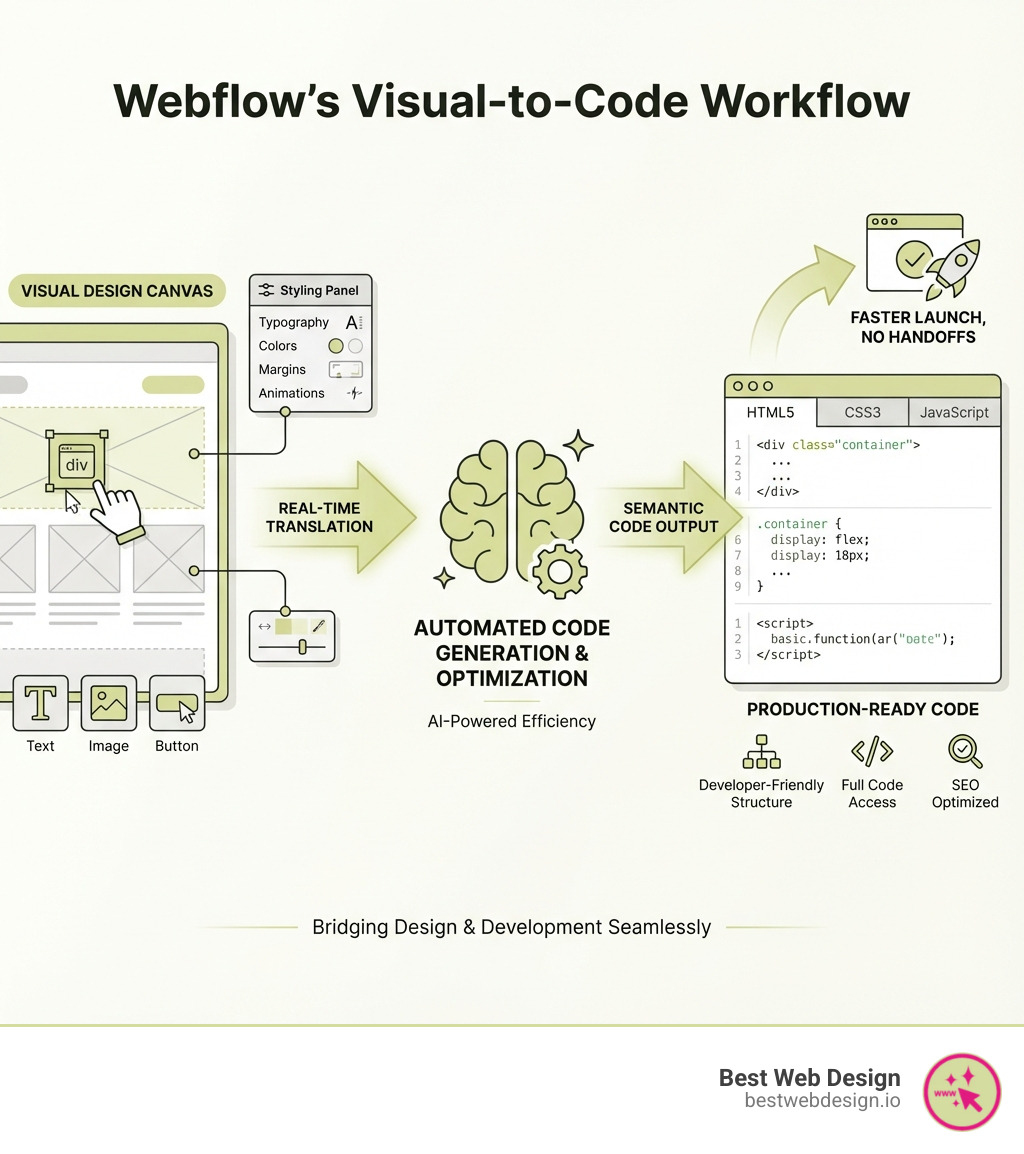
This infographic illustrates Webflow’s core workflow: designers drag HTML elements onto the canvas, apply styling through visual controls (margins, colors, typography, animations), and Webflow automatically generates clean HTML5, CSS3, and JavaScript code that’s ready for production. The visual editor mirrors the box model, flexbox, and CSS grid—making complex layouts accessible without memorizing syntax.
What is Webflow and How Does it Redefine Website Creation?
At its heart, Webflow is a visual development platform bridging the gap between design and code. It combines the pixel-perfect control of a design tool like Figma with automatic generation of clean, production-ready HTML, CSS, and JavaScript. It’s a sophisticated environment where designers directly manipulate web elements, and developers get semantic, standards-compliant code.
This approach sets Webflow apart from traditional website builders. Many builders offer a “no-code” solution, which often means sacrificing design flexibility for ease of use, resulting in generic, template-based websites. Webflow, however, offers a “low-code” or “no-code for designers, full-code for developers” philosophy. This means we can start with a blank canvas and craft truly custom designs from scratch, rather than being confined to rigid templates. While template-based builders like Wix or Squarespace provide a quick start, they often hit a wall when unique branding or complex functionality is required. Webflow, conversely, empowers us to build unique digital experiences that perfectly align with your vision.
The power of Webflow lies in its ability to translate visual design into clean, semantic code. As you drag and drop HTML elements and style them with visual controls, Webflow automatically writes HTML5, CSS3, and JavaScript. This means we get all the benefits of a robust, custom-coded website without the manual coding effort for basic structures and styles. This unique ecosystem solves many of the common challenges inherent in other big-brand CMS platforms, such as WordPress or Wix, which often rely on template-based approaches. It’s a key reason why Webflow powers a growing share of modern websites, currently accounting for 0.7% of all websites.
The Core of Webflow Design and Development
The visual design canvas in Webflow is a designer’s playground. It’s an intuitive interface that allows for direct manipulation of web elements, giving us precise control over layout, typography, colors, and interactions. We can literally see our designs come to life as we build them, without ever needing to write a single line of code. Key features for designers include:
- Visual-to-Code Engine: Every design decision in the visual editor is instantly converted into clean, semantic HTML5, CSS3, and JavaScript, ensuring aesthetics are backed by robust, well-structured code.
- Full Control over HTML/CSS: Webflow provides direct control over HTML elements and all CSS properties. This allows for custom styling, Box Model manipulation, and building intricate Flexbox and CSS Grid layouts visually.
- Blank Canvas Approach: While Webflow offers over 100 beautiful, flexible templates (including 21 completely free options!), its true strength lies in its blank canvas. This allows us to start from scratch, ensuring that your website is truly unique and perfectly custom to your brand, not just a variation of a common theme.
- Responsive Design Tools: Building for multiple devices is effortless. Webflow’s responsive design tools allow us to design on desktop, and the styles automatically cascade to tablet and mobile views. We can then make device-specific adjustments with ease, ensuring a flawless experience on any screen size.
- Animations and Interactions: Webflow makes it simple to add dynamic content, captivating animations, and rich interactions without writing complex JavaScript. From subtle hovers to scroll-triggered sequences and 3D transforms, we can bring your website to life and create memorable user experiences.
This direct control and visual approach empower us to create custom designs with unparalleled flexibility, far surpassing the limitations of template-based builders.
The Powerful, Composable CMS
A website isn’t just about static pages; it’s about managing dynamic content effectively. Webflow’s powerful, composable CMS (Content Management System) is a game-changer for content creators and marketers. It allows us to build custom content structures that perfectly match your data, whether it’s blog posts, team members, products, or case studies. We define the field types (text, images, rich text, numbers, references) and Webflow handles the database.
The benefits of Webflow’s CMS are profound:
- Custom Content Structures: We can design a CMS that truly reflects your site’s content, making it intuitive and efficient to manage. No more shoehorning content into predefined fields.
- Dynamic Content: Once your content is in the CMS, it can be dynamically displayed across your site. This means we can design a single blog post template, and all your blog articles will automatically adopt that design, saving immense time and ensuring consistency.
- Visual Editor for Clients: This is where Webflow shines for client handoffs. The intuitive visual editor allows clients and marketing teams to create, edit, and manage content directly on the live website. They see their changes in real-time, eliminating the need for technical skills or developer intervention for routine content updates. This drastically simplifies content management and empowers your team.
- CMS API & CSV Export: For advanced use cases, Webflow offers a robust CMS API, allowing programmatic access to your content. We can also export CMS content as a CSV, providing flexibility for data management and migrations.
- Content That Converts: Webflow’s visual, composable CMS lets you create and manage content that drives results. Coupled with built-in SEO and AEO (Answer Engine Optimization) tools, we can optimize content for both traditional and AI-driven search, helping your website get found and convert visitors into customers.
With Webflow, managing your content becomes a seamless, visual process, giving you complete control over your digital narrative. If you’re looking to lift your content strategy, More info about our offerings can guide you.
Unpacking Webflow Design and Development for Modern Teams

In today’s digital landscape, effective teamwork is paramount. Webflow is engineered to streamline workflows and foster collaboration across diverse teams—marketing, design, and engineering. It’s more than just a tool; it’s a collaborative ecosystem that integrates seamlessly into your existing processes, whether your team is in San Diego, Los Angeles, Miami, or Las Vegas.
Webflow empowers marketing teams to build web experiences visually, with help from AI, while keeping everything on-brand with design systems and designer-approved building blocks. This means marketing can launch campaigns and A/B tests without waiting for development resources, significantly increasing speed to market. Design teams gain pixel-perfect control and the ability to create rich interactions and animations without coding, while engineering teams can focus on complex integrations and custom functionalities, knowing the front-end is handled with clean, semantic code.
AI Integration for Smarter Workflows
Webflow is at the forefront of integrating artificial intelligence into the web development process, positioning itself as an AI-native platform. This isn’t just a buzzword; it’s a suite of features designed to make our workflows smarter, faster, and more impactful.
- AI Assistant: Webflow’s AI helps generate production-ready apps and reusable components, reducing time on repetitive tasks so we can focus on high-impact creative work.
- Content Creation: AI capabilities extend to content, enabling bulk generation of copy and CMS items. This accelerates content creation, ensuring a flow of fresh, engaging material.
- Optimization (CRO): Webflow leverages AI for conversion rate optimization. It provides AI-powered suggestions and analytics to help us understand what works, allowing us to continually test and improve your site based on CRO best practices.
- Personalization and Localization: To reach a global audience effectively, Webflow offers AI-powered personalization and localization tools. These features empower us to tailor content and experiences for different demographics and regions, driving revenue and global reach. This is crucial for businesses aiming for a broader market, offering custom experiences whether they are in Miami or Los Angeles.
- AI-Generated Components: Imagine generating UI elements or even entire sections of a website with AI. Webflow is moving towards this reality, providing reusable, AI-generated components that maintain brand consistency while accelerating development.
By integrating AI, Webflow helps us go from idea to impact faster, creating dynamic digital experiences that resonate with humans and are readable by bots.
Built for Performance, Security, and SEO
A beautiful website is only effective if it’s fast, secure, and findable. Webflow excels in these critical areas, providing a robust foundation for your online presence.
- Managed Hosting: Webflow offers best-in-class website hosting powered by Amazon Web Services (AWS) and Fastly. This means your sites load incredibly quickly on any device, enjoy 99.9% uptime, and are well-defended against potential hacks. We benefit from a global CDN (Content Delivery Network) and edge routing, ensuring rapid content delivery to users worldwide, including those across San Diego, Las Vegas, and beyond.
- Security: Security is paramount. Webflow provides 24/7 managed security, including audit logs and site backups. This means your data is protected, and in the rare event of an issue, we can restore previous versions with ease.
- Code Export Options: For those who need it, Webflow offers a one-click code export option. With a Personal plan or higher, we can download your site’s clean HTML, CSS, and JavaScript in a ZIP file. This is ideal for handing off projects to internal development teams or integrating with other systems. CMS content is not exported with the code.
- SEO Tools: Webflow is built with SEO in mind. It generates clean, semantic code that search engines love. It includes built-in SEO tools such as automatically generated XML sitemaps, page-level meta titles and descriptions for both static and dynamic content, Open Graph (OG) settings for social media, easy 301 redirects, and the ability to add alt tags to images.
- Answer Engine Optimization (AEO): In the age of AI-driven search and voice assistants, AEO is critical. Webflow’s visual, composable CMS, combined with its built-in tools, helps us optimize content for both traditional and AI-driven search, ensuring your website gets found and provides direct answers.
Our commitment to building high-performing, secure, and SEO-friendly websites aligns perfectly with Webflow’s capabilities. To understand more about our approach, Learn more about us.
The Webflow Ecosystem: Learning, Community, and Professional Partners
Webflow isn’t just a platform; it’s a thriving ecosystem designed to support users at every stage of their journey. From comprehensive learning resources to a vibrant community and a network of expert partners, Webflow ensures that you have the tools and support needed to succeed.
Level Up with Webflow University and Interactive Games
Webflow University is an unparalleled resource for anyone looking to master webflow design and development. It’s a free, comprehensive learning hub offering structured learning paths, in-depth courses, and video tutorials for users at all skill levels—from absolute beginners to seasoned professionals.
The content covers everything from design basics, like understanding the Box Model and Flexbox, to advanced topics such as creating responsive layouts with CSS Grid, implementing custom CSS properties, and mastering interactions and animations. The beauty of Webflow University is its engaging approach to education. Learning has never been so fun, thanks to interactive tools and games:
- The Layout Game: Test your understanding of web layouts.
- The Grid Game: Master the intricacies of CSS Grid.
- The Eyeballing Game: Put your design eye to the test with The Eyeballing Game and compete for accuracy in design challenges.
- The Flexbox Game: Improve your Flexbox skills through interactive puzzles.
- The Box Model Game: Solidify your understanding of the fundamental Box Model concept.
These gamified learning experiences make complex design concepts approachable and enjoyable, helping users solidify their skills in a practical, interactive way.
Tapping into the #MadeinWebflow Community
The #MadeinWebflow community is a vibrant testament to the platform’s capabilities and a fantastic resource for inspiration and learning. This online showcase features thousands of websites built by Webflow users, ranging from stunning portfolios and marketing sites to complex e-commerce stores and web applications.
Users can browse, clone, and customize these community-built sites, offering an incredible opportunity to:
- Learn from Existing Projects: By cloning a site, you can deconstruct its design and development, understanding how complex layouts, interactions, or CMS structures were built. It’s like having access to thousands of open-source projects specifically for Webflow.
- Accelerate Development: Need a specific component or a starting point for a new project? The community offers cloneable elements and full templates, allowing you to integrate proven solutions directly into your work.
- Showcase Your Work: The community is also a place to share your own creations, receive feedback, and build your professional portfolio.
This collaborative spirit fosters continuous learning and pushes the boundaries of what’s possible with Webflow.
Choosing a Partner for Your Webflow Design and Development Project
For businesses looking to leverage Webflow’s power without building an in-house team, partnering with a specialized agency is a strategic move. A good Webflow agency can act as a creative extension of your team, providing the technical depth and experience to deliver complex projects at speed, whether you’re a startup or an established enterprise.
When considering a partner for your webflow design and development needs, especially for businesses in San Diego, Los Angeles, Miami, or Las Vegas, here are key considerations:
- Portfolio and Case Studies: Review their past work to ensure their design aesthetic and technical capabilities align with your vision and project scope.
- Technical Depth: A strong agency understands Webflow’s visual interface and its underlying code, including custom HTML, CSS, JavaScript, and API integrations.
- Enterprise Experience: For larger organizations, look for agencies with proven experience in handling complex integrations, multi-team collaboration, and adherence to enterprise-level security and performance standards (e.g., SOC 2 compliance).
- Specialization: Some agencies specialize in B2B SaaS, e-commerce, or particular design styles. Choose one whose specialization matches your business needs.
- Process and Communication: A clear, transparent process and excellent communication are vital. Look for partners who offer predictable pricing, regular updates, and a collaborative approach.
- Support and Optimization: The partnership shouldn’t end at launch. Consider agencies that offer ongoing support, SEO optimization, CRO experiments, and analytics reporting to ensure continued growth.
Choosing the right partner is crucial for maximizing your return on investment in Webflow. For further guidance on agency selection and best practices, Read our blog for more tips.
Advanced Features: E-commerce, Integrations, and Enterprise Solutions
Webflow’s capabilities extend far beyond static marketing websites. It’s a robust platform for building dynamic e-commerce stores, integrating with a vast ecosystem of third-party tools, and providing enterprise-grade solutions for large organizations. This means that whether you’re a small business in Las Vegas launching an online shop or a large corporation in Los Angeles needing a scalable web presence, Webflow has the tools to meet your needs.
Building E-commerce and Custom Solutions
Webflow E-commerce provides a powerful yet flexible platform for online stores. We can design a completely custom storefront, integrate product listings with the CMS, manage orders, and process payments—all within the Webflow environment. Unlike template-driven e-commerce solutions, Webflow gives us complete control over the design and user experience of your online store, ensuring it perfectly aligns with your brand.
Beyond native e-commerce, Webflow excels in custom integrations and automation:
- Custom Code Embeds: For unique functionalities, we can easily embed custom HTML, CSS, and JavaScript directly into your Webflow site. This allows us to extend the platform’s capabilities without compromising the visual design workflow.
- API Integrations: Webflow’s CMS API allows for programmatic interaction with your content, enabling integrations with custom applications or backend systems.
- Logic Flows: Webflow Logic empowers us to create custom workflows and connect different parts of your site without writing code. For example, we can create contacts in HubSpot from Webflow forms or records in Airtable.
- Connecting to 500+ Apps: Through Zapier integration, Webflow can connect with over 500 of the world’s most popular apps. This opens up a world of automation possibilities, from streamlining lead generation to managing email campaigns. For instance, we can set up RSS automations to automatically trigger actions when new content is published, or automate your email newsletter via MailChimp with your dynamic content.
Scaling with Webflow Enterprise
For large organizations and B2B SaaS companies, Webflow Enterprise offers a specialized suite of features and services designed for high-performance, security, and scalability. It’s about providing the infrastructure and support needed to operate at an enterprise level.
Key benefits of Webflow Enterprise include:
- Advanced Security and Compliance: Enterprise plans often come with improved security measures, including SOC 2 compliance, audit logs, and robust protection against threats, crucial for safeguarding sensitive data and maintaining trust.
- Guaranteed Uptime and Performance: With 99.99% uptime guarantees, global CDN, and edge routing, Webflow Enterprise ensures uninterrupted momentum and blazing-fast site performance, even under heavy traffic loads.
- Dedicated Support: Large organizations benefit from priority support and dedicated account management, ensuring rapid resolution of any issues and strategic guidance for their web presence.
- Multi-team Collaboration: Webflow Enterprise facilitates complex multi-team collaboration with features like roles and permissions, branching, staging environments, and advanced version control, ensuring smooth workflows for large, distributed teams.
- Significant Business Impact: The results speak for themselves. Companies like Lattice achieved a 20% increase in site-wide conversion, Orangetheory Fitness realized $6M in cost savings annually, and Fivetran saw a 98% increase in speed to market using Webflow Enterprise. These case studies highlight the platform’s ability to drive tangible business outcomes for large organizations.
Webflow Enterprise provides the robust foundation and flexibility that growing businesses need to scale their digital presence with confidence.
Frequently Asked Questions about Webflow
What makes Webflow different from other website builders?
Webflow stands out primarily due to its unique combination of visual design control and clean code generation. Unlike template-based builders like Wix or Squarespace, which often limit creative freedom, Webflow allows us to build custom designs from a blank canvas with pixel-perfect precision. It doesn’t just create a website; it writes semantic HTML5, CSS3, and JavaScript as we design, giving us full control over the underlying code without having to manually write it. This means higher performance, better SEO, and ultimate design flexibility compared to many alternatives.
Furthermore, Webflow is an all-in-one platform that includes robust hosting powered by AWS and Fastly, enterprise-grade security features, and a powerful, composable CMS. This integrated approach simplifies the entire web development lifecycle, from design to deployment and content management, all within a single, intuitive environment.
Can I export my code from Webflow?
Yes, you can export your code from Webflow. With a paid site plan (Personal or higher), Webflow allows you to download your site’s HTML, CSS, and JavaScript files in a clean, production-ready format. This is a significant advantage for developers or teams who might need to host their site elsewhere, integrate it into a larger application, or simply have a backup of the generated code.
However, it’s important to note that while the design and structural code can be exported, content created and managed within Webflow’s CMS cannot be exported as part of the code package. The CMS content is dynamic and lives within Webflow’s database, accessible via its API or CSV export functionality. This feature makes Webflow an excellent tool for agencies and freelancers who need to hand off a fully coded, custom website to a client’s internal development team for further integration or maintenance.
Is Webflow good for SEO?
Absolutely! Webflow is exceptionally good for SEO, often outperforming websites built on other platforms due to several inherent advantages:
- Clean, Semantic Code: Webflow automatically generates clean, W3C compliant HTML5 and CSS3. Search engines love clean code because it’s easier to crawl and understand, which contributes positively to rankings.
- Blazing-Fast Loading Speeds: Hosted on AWS and Fastly’s global CDN, Webflow sites are known for their incredible loading speeds. Page speed is a critical ranking factor, and Webflow’s optimized hosting infrastructure gives your site a significant advantage.
- Mobile-First Design: Webflow is built for responsive design, ensuring your website looks and performs flawlessly on all devices. Mobile-friendliness is another crucial SEO signal.
- Built-in SEO Tools: Webflow provides comprehensive built-in SEO tools. We have full control over page-level meta titles and descriptions, custom Open Graph (OG) settings for social media sharing, automatically generated XML sitemaps, easy 301 redirects, and the ability to add alt tags to all images.
- Answer Engine Optimization (AEO): Beyond traditional SEO, Webflow’s composable CMS and dynamic content capabilities enable effective AEO. This helps optimize content to directly answer user queries, making your site more findable in AI-driven search results and voice searches.
Combined, these features make Webflow a powerful platform for building SEO-friendly websites that rank well and get found by your target audience.
Conclusion
As we’ve explored, webflow design and development represents a powerful paradigm shift in how websites are created. It’s a platform that seamlessly merges the creative freedom of design with the robust functionality of development, empowering teams to build, manage, and optimize stunning, high-performing websites with unprecedented efficiency.
From its intuitive visual canvas that generates clean, semantic code, to its powerful composable CMS, AI integrations, and enterprise-grade hosting and security, Webflow provides a comprehensive solution for modern web needs. It fosters collaboration, accelerates workflows, and ensures that your digital presence is not only beautiful but also technically sound, fast, and optimized for findy.
Whether you’re a startup looking for agility, a growing business needing scalability, or an enterprise demanding performance and security, Webflow offers the tools to succeed. Our expertise in webflow design and development allows us to harness this platform to craft exceptional digital experiences that drive user retention and business growth for clients across San Diego, Los Angeles, Miami, and Las Vegas.
Ready to transform your online presence? Explore our Webflow Design & Development Services to see how we can help you build beyond the code.