

Why Choose React for Modern Web Development?
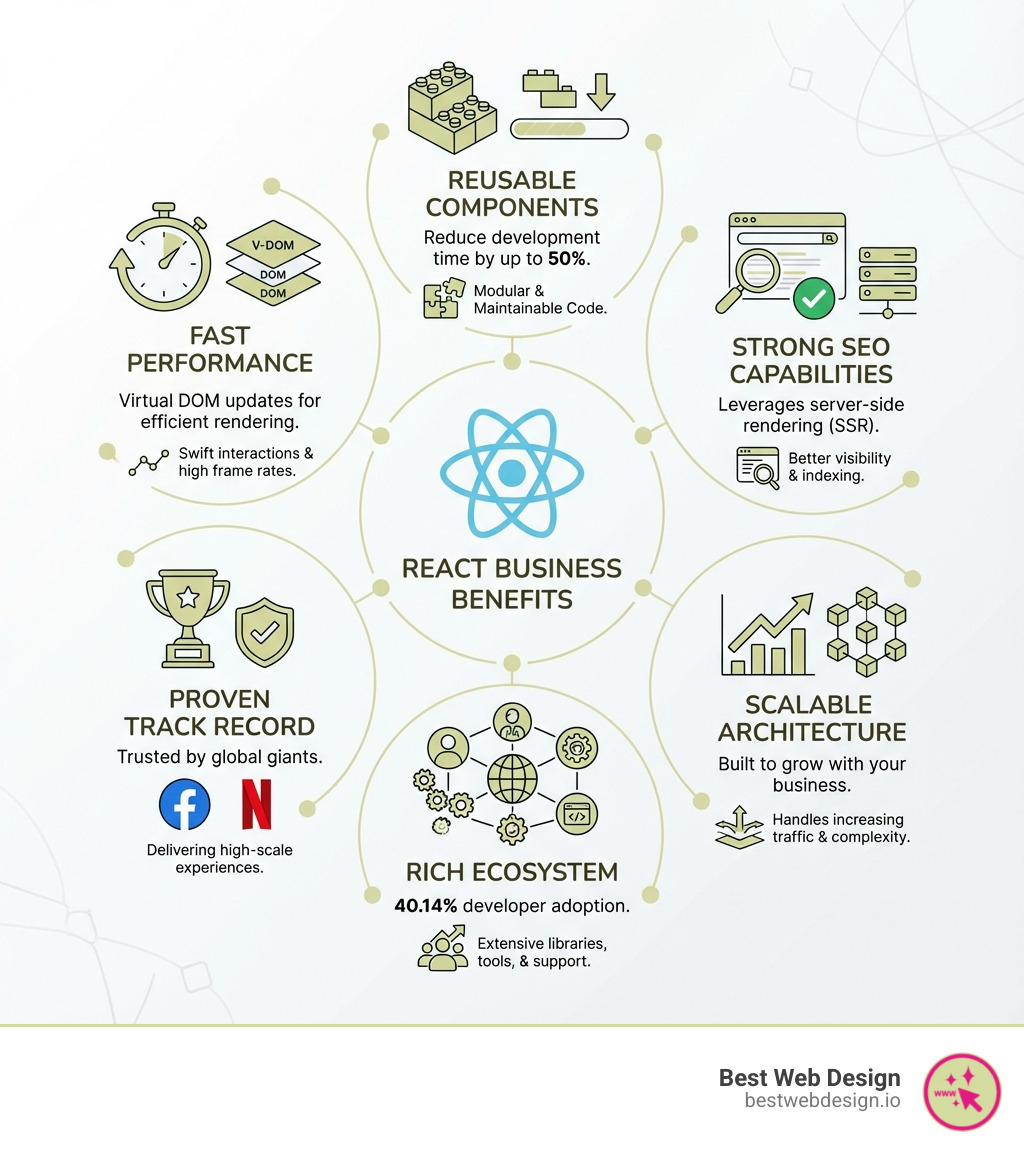
React website development is the go-to approach for building fast, interactive, and scalable websites. As a JavaScript library for creating user interfaces, it’s used by over 42% of websites globally, making it the most popular front-end solution for developers at companies like Facebook, Instagram, and Netflix.
React takes a declarative approach to building websites. Instead of manually manipulating the webpage structure, you describe what your UI should look like for any given state. React then efficiently updates and renders only the necessary components when your data changes. This is powered by its Virtual DOM, which ensures high performance.
The component-based architecture is React’s biggest strength. You build encapsulated components that manage their own state and then compose them to create complex UIs. This leads to faster development, easier maintenance, and code reusability across your website.
React is more than a library; it’s a thriving community of developers, designers, and learners collaborating to build better user experiences. With demand for React developers growing rapidly, this ecosystem continues to expand, making it a reliable choice for modern web projects.
The Core Concepts of React Development
At its heart, react website development revolves around a few fundamental concepts. Understanding how data flows, how components interact, and how state is managed is crucial to mastering React.
Understanding Components: The Building Blocks
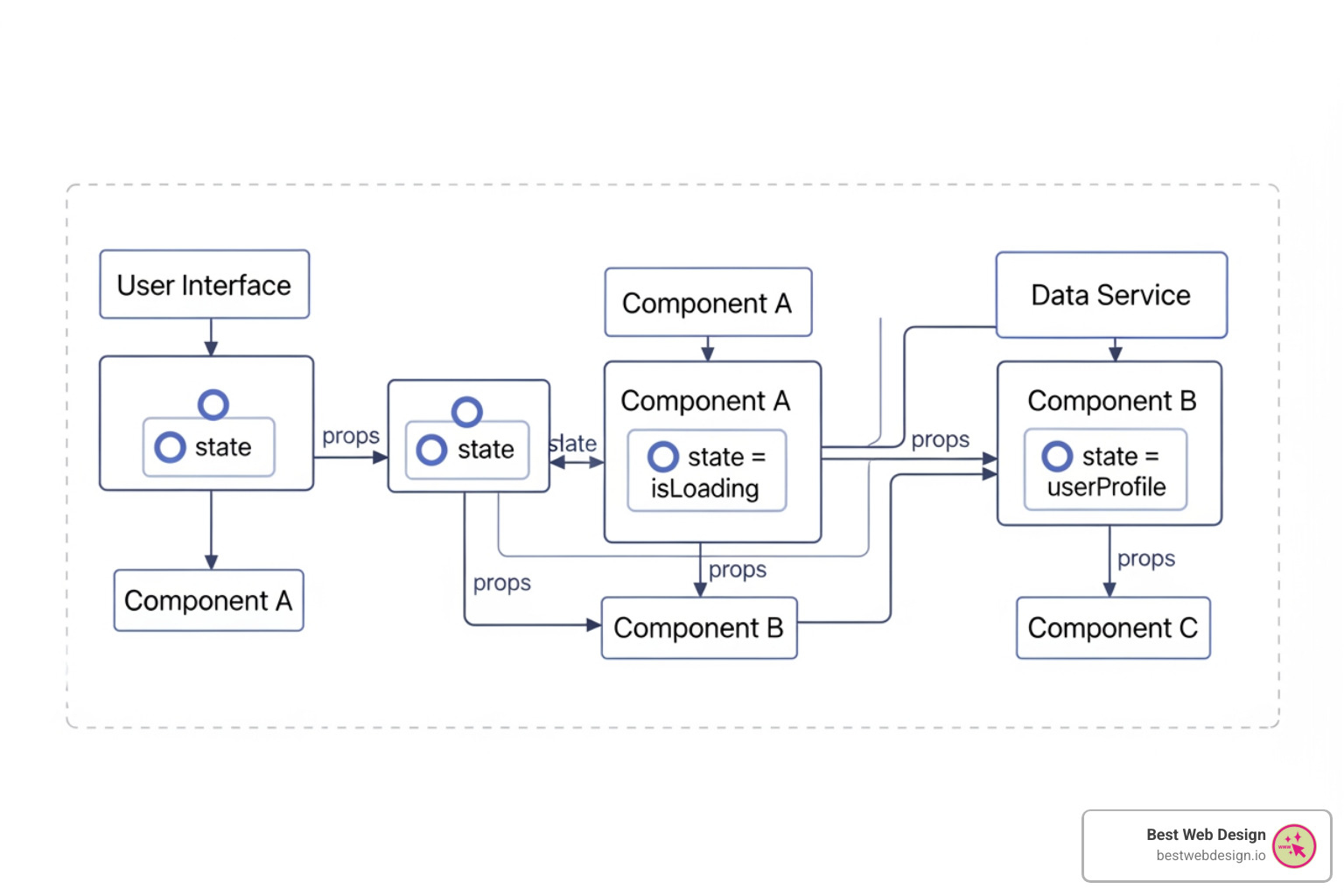
In React, you build UIs from small, reusable pieces called components. Think of them as custom HTML tags you can create. Components are JavaScript functions that return markup, and they are self-contained and reusable. For example, a Header component might contain a logo and navigation, while a ProductCard displays an item’s details.
Component names must start with a capital letter (e.g., MyButton). You can then nest them to build complex UIs from simple parts.
// MyButton.jsx
function MyButton() {
  return (
    <button>
      I'm a button
    </button>
  );
}

export default MyButton; // Makes the component available for use elsewhere
Writing Markup with JSX (JavaScript XML)
JSX is a syntax extension for JavaScript that lets you write HTML-like markup directly in your code. It makes describing UI structures more intuitive. While it looks like HTML, JSX has a few rules:
- Return a single root element: Wrap multiple elements in a
<div>or a Fragment (<>...</>). - Close all tags: Self-closing tags like
<img>must be written as<img />. - Use
classNamefor CSS classes:classis a reserved word in JavaScript. - Embed JavaScript with
{}: Use curly braces to include variables or expressions in your markup.
function Greeting({ isLoggedIn }) {
  const userName = "Traveler";
  return (
    <h1 className="greeting-title">
      Welcome, {isLoggedIn ? userName : "Guest"}!
    </h1>
  );
}
Curious how JSX becomes regular JavaScript? You can [Try the Babel REPL](https://babeljs.io/repl/#?presets=react&code_lz=MYewdgzgLgBApgGzgWzmWBeGAeAFgRgD4AJRBEAGhgHcQAnBAEwEJsB6AwgbgChRJY_KAEMAlmDh0YWRiGABXVOgB0AczhQAokiVQAQgE8AkowAUAcjogQUcwEpeAJTjDgUACIB5ALLK6aRklTRBQ0KCohMQk6Bx4gA) to see the compilation.
Managing Data with State and Props
React uses two main ways to manage data: props and state.
Props (Properties) are used to pass data from a parent component to a child, similar to function arguments. Props are read-only, which ensures a predictable, one-way data flow.
// Child component receiving props
function UserProfile(props) {
  return <h2>{props.userName}</h2>;
}

// Parent component passing props
// <UserProfile userName="Mo Aguilar" />
State is data that a component manages internally. It’s used for values that change over time, like user input or fetched data. When a component’s state changes, React automatically re-renders it to reflect the update. A common pattern is “lifting state up” to a common ancestor component to share state between components.
Introducing React Hooks for Functional Components
Hooks are functions that let you “hook into” React features like state and lifecycle methods from functional components. They make code cleaner and more reusable. The two most common Hooks are useState and useEffect.
-
useState: Adds state to a functional component. It returns the current state value and a function to update it.import { useState } from 'react'; function Counter() { const [count, setCount] = useState(0); return ( <button onClick={() => setCount(count + 1)}> Clicked {count} times </button> ); } -
useEffect: Performs “side effects” after rendering, such as fetching data or setting up subscriptions. You can control when it runs to optimize performance.import { useState, useEffect } from 'react'; function DataFetcher() { const [data, setData] = useState(null); useEffect(() => { fetch('https://api.example.com/items') .then(res => res.json()) .then(setData); }, []); // Empty array means this runs only once return <div>{data ? JSON.stringify(data) : 'Loading...'}</div>; }
Hooks are an indispensable tool in modern react website development, enabling powerful, stateful UIs without class components.

Getting Started with Your First React Website Development Project
Setting up your first react website development project is straightforward with modern tools. We’ll use Vite, a fast build tool, to get up and running quickly.
Setting Up Your Development Environment
First, ensure your environment is ready:
- Install Node.js: React development requires Node.js and its package manager, npm. Download the latest LTS version from the
[Node.js installation](https://nodejs.org/en/)website (version 18+ is required for Vite 5.0). - Use a Build Tool: We’ll use Vite to bundle our project files for the browser.
Open your terminal and run this command to create a new React project:
npm create vite@latest my-react-app -- --template react
This command scaffolds a new React project in a folder named my-react-app. Next, steer into the directory and install the dependencies:
cd my-react-app
npm install
Finally, start the development server:
npm run dev
Your new React app will open in your browser, and you’re ready to start developing!
Your First React Component and Project Structure
Vite creates a simple project structure:
src/: This is where you’ll do most of your work.src/App.jsx: The main application component. This is the best place to start editing.src/main.jsx: The entry point of your app. It renders theAppcomponent into theindex.htmlfile.
index.html: The single HTML file that hosts your React application.package.json: Contains project metadata and dependencies.
The initial App.jsx file includes a simple counter component that demonstrates the use of JSX and the useState Hook.
// src/App.jsx
import { useState } from 'react'
import './App.css'

function App() {
  const [count, setCount] = useState(0)

  return (
    <div className="card">
      <button onClick={() => setCount((count) => count + 1)}>
        count is {count}
      </button>
      <p>
        Edit <code>src/App.jsx</code> and save to test HMR
      </p>
    </div>
  )
}

export default App
At Best Web Design, we leverage this robust foundation to build stunning, high-performance websites. Want to see how we apply these principles to create compelling digital experiences? [More about our design and development process](https://bestwebdesign.io/offerings/).
Building Dynamic UIs in React
The magic of react website development is making UIs dynamic and responsive. This involves handling events, rendering content conditionally, displaying lists, and styling components.
Handling User Interactions and Events
React handles user interactions like clicks or typing with event handlers attached to JSX elements. These handlers are functions passed to props like onClick or onChange.
function ButtonClicker() {
  function handleClick() {
    alert('You clicked the button!');
  }

  return (
    <button onClick={handleClick}>
      Click Me
    </button>
  );
}
Event handlers often update a component’s state to reflect a change. For example, a button click can toggle the visibility of a message.
import React, { useState } from 'react';

function ToggleMessage() {
  const [isVisible, setIsVisible] = useState(false);

  return (
    <div>
      <button onClick={() => setIsVisible(!isVisible)}>
        {isVisible ? 'Hide' : 'Show'} Message
      </button>
      {isVisible && <p>Hello there!</p>}
    </div>
  );
}
Conditional Rendering and Displaying Lists
React uses standard JavaScript to conditionally render content and display lists.
Conditional Rendering: You can use if statements, the ternary operator (? :), or the logical && operator to decide what to render.
function AdminPanel({ isAdmin }) {
  return (
    <div>
      {isAdmin ? <p>Welcome, Admin!</p> : <p>Welcome, User!</p>}
      {isAdmin && <button>Manage Users</button>}
    </div>
  );
}
Displaying Lists: To render a list of items, use JavaScript’s [array.map() function](https://developer.mozilla.org/en-US/docs/Web/JavaScript/Reference/Global_Objects/Array/map). It’s crucial to provide a unique key prop for each item in the list. This helps React efficiently update the UI.
function ProductList({ products }) {
  return (
    <ul>
      {products.map(product => (
        <li key={product.id}> {/* 'key' is crucial! */}
          {product.name}
        </li>
      ))}
    </ul>
  );
}
Styling Your React Components
React is flexible with styling. Here are a few common approaches:
-
CSS Stylesheets: Import a
.cssfile into your component and use theclassNameattribute. This is simple and familiar.import './App.css'; function MyHeader() { return <header className="header">My App</header>; } -
Inline Styles: Apply styles directly using a JavaScript object. This is useful for dynamic styles that depend on state or props.
function DynamicText({ color }) { const textStyle = { color: color, fontSize: '24px' }; return <p style={textStyle}>This text changes color!</p>; } -
CSS Modules: Scope CSS locally to a component to avoid class name conflicts. Import a
.module.cssfile and access class names as properties of the imported object. -
CSS-in-JS Libraries: Libraries like Styled Components or Emotion let you write CSS directly in your JavaScript files, creating tightly-coupled, component-level styles.
React in the Broader Ecosystem
React’s popularity has created a rich ecosystem of tools. Understanding its place relative to other technologies and its extension into mobile development is key to appreciating its full potential in react website development.
React vs. Other JavaScript Technologies
React is a JavaScript library for building user interfaces, not a full-fledged framework. This means it focuses on the “view” layer, giving you the flexibility to choose other libraries for routing or global state management.
- Library vs. Framework: Frameworks like Angular or Vue.js offer a more comprehensive, opinionated structure for an entire application. React is less opinionated, focusing solely on UI rendering.
- Virtual DOM: React uses a Virtual DOM, a lightweight copy of the actual DOM. When state changes, React updates this virtual copy first, then efficiently calculates and applies only the necessary changes to the real DOM. This makes UI updates very fast.
- Declarative UI: You describe the UI you want for a given state, and React handles the rendering logic.
Here’s a simplified comparison:
| Feature | React’s Approach | General Framework Approach (e.g., Angular, Vue) |
|---|---|---|
| Primary Role | UI Library (focus on view layer) | Full-fledged Framework (provides complete application structure) |
| JSX | Custom syntax for UI description | Often uses template languages (e.g., HTML with directives) |
| Virtual DOM | Yes, for efficient UI updates | Often uses Virtual DOM (Vue) or direct DOM manipulation (Angular) |
| Routing | External library (e.g., React Router) | Built-in or officially supported module |
| State Management | Hooks (useState), Context API; external libraries (Redux, Zustand) |
Built-in (e.g., Vuex in Vue) or strong official recommendation |
Expanding Beyond the Web with React Native
React’s “Learn Once, Write Anywhere” philosophy allows you to apply your web development skills to other platforms. React Native is a framework for building native mobile apps for iOS and Android using JavaScript and React.
Instead of rendering to a browser’s DOM, React Native renders to native UI components. This results in truly native applications with native performance. A significant amount of application logic and state management code can be shared between a React web app and a React Native mobile app, saving development time and cost.
If you’re building a web app with React, exploring [React Native for mobile apps](https://reactnative.dev/) is a natural next step for expanding your reach.
Best Practices and Next Steps
Mastering react website development is an ongoing journey. Following best practices will help you build robust applications, and there’s a clear path for continued learning.
[Check out our latest articles on the Blog](https://bestwebdesign.io/blog/) for more insights into web design and development trends.
Common Use Cases and Best Practices for react website development
React is versatile enough for many projects. Here are some common use cases and best practices we follow at Best Web Design:
Common Use Cases:
- Single-Page Applications (SPAs): For fluid, app-like experiences (e.g., Gmail, social media feeds).
- Interactive Dashboards: For data visualization and complex admin panels.
- E-commerce Sites: For dynamic product listings, carts, and checkout flows.
Best Practices:
- Component Composition: Build small, focused, reusable components.
- Effective State Management: Use
useStatefor local state. For shared or global state, consider React’s Context API or libraries like Redux or Zustand. - Avoid Prop Drilling: Use Context API for data needed by deeply nested components.
- Use
keyProps for Lists: Always provide unique, stablekeyprops when rendering lists to ensure efficient UI updates. - Accessibility (A11y): Build with accessibility in mind using semantic HTML and ARIA attributes.
- Testing: Write tests for your components using libraries like React Testing Library.
Adhering to these practices ensures your projects are robust, scalable, and maintainable.
Your Learning Path and Next Steps in react website development
You now have a solid grasp of React fundamentals. Here are some next steps to deepen your knowledge:
- Master More Hooks: Explore
useContext,useReducer,useCallback, anduseMemofor state management and performance optimization. - Learn React Router: Handle client-side navigation in your SPAs.
- Advanced Data Fetching: Look into libraries like React Query (TanStack Query) or SWR for simplified data fetching and caching.
- Server-Side Rendering (SSR): Investigate frameworks like Next.js or Gatsby, which build on React to improve SEO and performance.
- Integrate TypeScript: Add static typing to your projects to catch errors early and improve code maintainability.
- Get Certified: Consider a structured course to validate your skills, like this
[React course](https://shop.w3schools.com/collections/course-catalog/products/react-js-course).
Consistency is key. Keep building projects and engaging with the React community.
Conclusion: Build Your Next High-Performance Website
We’ve explored how react website development has become a leader in crafting modern web experiences. Its declarative nature, component-based architecture, and efficient rendering via the Virtual DOM offer developers unparalleled flexibility and performance. As the most popular front-end library, React is a strategic choice for businesses aiming to build high-performance web and mobile applications.
At Best Web Design, we specialize in leveraging the full potential of React to deliver data-driven, conversion-focused digital products. Our expertise in UI/UX and cutting-edge development ensures your website not only looks stunning but also drives user retention and business growth.
Ready to transform your online presence with a cutting-edge React website? [Explore our web development offerings](https://bestwebdesign.io/offerings/) and let’s build something amazing together!